
An XML sitemap, usually published as sitemap.xml, is a file that lists the pages on your site you want search engines to find, usually with the date each one last changed. It sits at an address such as /sitemap.xml or /sitemap_index.xml, and you point search engines to it from robots.txt or Search Console. A sitemap helps Google discover pages. It does not make them rank, and it does not guarantee they will be indexed.
This guide covers what goes in a sitemap, which parts Google actually reads, and how to create and submit one. It also shows what we found when we audited our own sitemap on 4 October 2026: every URL in it was healthy, yet the site was publishing two different sitemaps, and one of them was wrong.
XML Sitemap Example
The simplest valid sitemap lists one or more URLs inside a urlset element:
<?xml version="1.0" encoding="UTF-8"?>
<urlset xmlns="http://www.sitemaps.org/schemas/sitemap/0.9">
  <url>
    <loc>https://www.example.com/services/</loc>
    <lastmod>2026-10-01</lastmod>
  </url>
  <url>
    <loc>https://www.example.com/blog/xml-sitemap/</loc>
    <lastmod>2026-10-04</lastmod>
  </url>
</urlset>
Larger sites split their URLs across several sitemaps and list those files in a sitemap index. This is what WordPress SEO plugins such as Yoast produce:
<?xml version="1.0" encoding="UTF-8"?>
<sitemapindex xmlns="http://www.sitemaps.org/schemas/sitemap/0.9">
  <sitemap>
    <loc>https://www.example.com/post-sitemap.xml</loc>
    <lastmod>2026-10-04T18:13:09+00:00</lastmod>
  </sitemap>
  <sitemap>
    <loc>https://www.example.com/page-sitemap.xml</loc>
    <lastmod>2026-10-01T18:21:11+00:00</lastmod>
  </sitemap>
</sitemapindex>
What Google Reads in a Sitemap, and What It Ignores
Google’s guide to building and submitting a sitemap, last updated in July 2026, settles most of the arguments about sitemap tags:
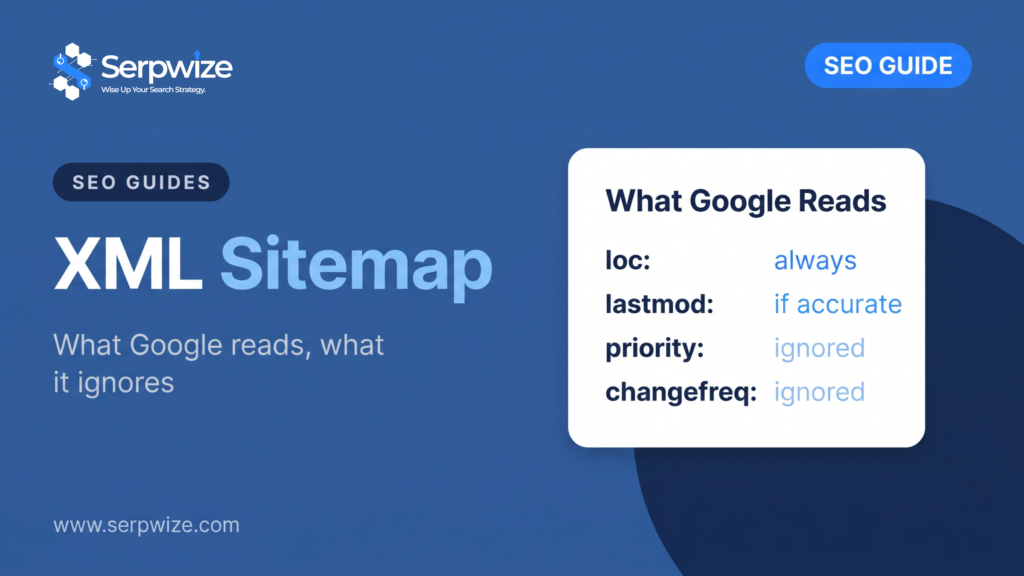
- <loc> is the only tag that matters every time. It should hold the full, canonical address of the page.
- <lastmod> is used only if it is accurate. Google uses it when it is consistently and verifiably correct, and it should change only for significant updates such as new main content, structured data or links. Changing a copyright year does not count.
- <priority> and <changefreq> are ignored. Google says so directly, so there is no point tuning them.
- Size limits apply per file. One sitemap can hold up to 50,000 URLs or 50MB uncompressed. Beyond that, split it and use a sitemap index.
- List only URLs you want in search results. Google generally shows canonical URLs, so the sitemap should list the canonical version of each page.
Do You Need an XML Sitemap?
Google’s sitemap overview says a site that is small, about 500 pages or fewer that you want in search, and well linked internally might not need one. A sitemap is more useful when:
- the site is large, so some pages are likely to have no internal links pointing at them;
- the site is new and has few links from other websites;
- the site has a lot of video or images, or appears in Google News.
Google also says that in most cases a site benefits from having one. Our own site has about 200 indexable URLs, well under the 500-page mark, and we still keep a sitemap because new pages get found sooner when they are listed the day they go live.
We Audited Our Own Sitemap: Clean URLs, Two Sitemaps
We fetched every URL listed in serpwize.com’s sitemaps and checked the status code, the robots tag and the canonical tag of each one, then compared the list with every page published on the site.
| Check | Result |
|---|---|
| URLs listed across the sitemap index | 205 in 6 files |
| URLs returning HTTP 200 | 205 of 205 |
| URLs with a noindex tag | 0 |
| URLs whose canonical points elsewhere | 0 |
| Published pages missing from the sitemap | 1, and correctly so: a page set to noindex |
| Pages that should not have been listed | 3 |
| Separate sitemaps being generated | 2 |
Problem 1: three widget pages in the sitemap
Our page builder stores each floating chat button as its own post type. Those posts had public addresses of their own, showing nothing but a chat prompt, and the SEO plugin listed all three in the sitemap. The buttons appear on real pages through display rules, so their stand-alone addresses had no reason to exist. We removed them from the sitemap and made the addresses return a 404. The buttons still show on the site as before.
Problem 2: a second, out-of-date sitemap
Our robots.txt pointed to the Yoast sitemap index, which was clean. But another plugin on the site was also writing its own file to /sitemap.xml every day. That second sitemap listed 214 URLs, including 12 page-builder template addresses that simply redirected to the home page and one page set to noindex, and it was missing the four newest pages. Anyone, or any tool, that checked /sitemap.xml got the worse list.
We switched off the second plugin’s sitemap job using its own setting, removed its file, and made /sitemap.xml redirect to the Yoast index. The site now publishes one sitemap with 202 URLs, all returning 200, all indexable and all self-canonical.
The lesson applies to any site with more than one SEO or optimisation plugin installed: check which plugins generate sitemaps, and keep only one.
How to Create an XML Sitemap
- WordPress: WordPress has generated a basic sitemap at /wp-sitemap.xml since version 5.5. SEO plugins such as Yoast and Rank Math replace it with a sitemap index and let you exclude post types and taxonomies you do not want listed.
- Shopify, Wix and Squarespace: these platforms generate /sitemap.xml automatically and update it as you publish.
- Custom or static sites: generate the file from your CMS or database, or use a crawler that exports a sitemap from the pages it can reach. Regenerate it whenever pages are added or removed.
Whatever creates it, check the output. The generator decides which post types go in, and the defaults often include things you would never want in search, as our own audit showed.
How to Submit a Sitemap to Google
- Search Console: open the Sitemaps report, enter the sitemap address and submit. The report then shows when Google last read it and how many URLs it found.
- robots.txt: add a line such as
Sitemap: https://www.example.com/sitemap_index.xml. Google picks it up the next time it reads robots.txt, and you can list more than one sitemap this way. - Search Console API: useful when sitemaps are generated automatically for many sites.
The old method of pinging Google with a sitemap URL no longer works. Google retired the sitemap ping endpoint in 2023.
Sitemap Checklist
- Every listed URL returns HTTP 200.
- No redirected, broken or noindexed URLs are listed.
- Each URL is the canonical version of its page.
- lastmod changes only when the page changes in a meaningful way.
- Only one tool generates the sitemap.
- No file exceeds 50,000 URLs or 50MB uncompressed.
- The sitemap is listed in robots.txt and submitted in Search Console.
- Utility pages, template previews and thank-you pages are excluded.
XML Sitemap or HTML Sitemap?
An XML sitemap is written for search engines and is not meant to be read by visitors. An HTML sitemap is an ordinary page that links to the main sections of a site for people. They do different jobs. Most sites need an XML sitemap and good navigation; an HTML sitemap helps mainly on large sites where visitors struggle to find their way around.
Frequently Asked Questions
What is an XML sitemap?
A file in XML format that lists the URLs on a website that the owner wants search engines to crawl, optionally with the date each page last changed. It helps search engines discover pages, especially new ones or ones with few internal links.
How do I find a website’s sitemap.xml?
Try /sitemap.xml, /sitemap_index.xml or /wp-sitemap.xml on your domain, or open /robots.txt and look for a line beginning with “Sitemap:”. In Search Console, the Sitemaps report lists any sitemap already submitted.
Is sitemap.xml still relevant?
Yes. Google still reads XML sitemaps and updated its own sitemap documentation in July 2026. They matter most for large sites, new sites with few links from elsewhere, and sites with a lot of images or video. For a small, well-linked site a sitemap is less critical, but it still helps new pages get found quickly and costs nothing to maintain.
Does an XML sitemap improve rankings?
No. A sitemap helps Google find and recrawl pages, and Google says listing a URL does not guarantee it will be crawled or indexed. Rankings depend on the pages themselves.
Does Google use priority and changefreq?
No. Google states that it ignores both tags. It uses lastmod, but only when the dates are consistently accurate.
Should noindex pages be in my sitemap?
No. A sitemap should list only pages you want to appear in search results. Listing a page you have also set to noindex sends Google two contradictory signals.
How often should a sitemap be updated?
Every time a page is published, removed or significantly changed. Most CMS platforms and SEO plugins do this automatically. If yours does not, regenerate the file whenever the site changes.
Want your sitemap and indexing checked? Sitemap and status-code checks are part of the free audit behind our professional SEO services.